Screen recordings that
zoom on every click
Record a tab and Zumie adds smooth zooms, click effects and a clean background for you. Screen Studio-style videos on Windows, Mac and Chromebook, right in Chrome.
Zumie runs in desktop Chrome. Get the link on your computer:
One email with the link, then a few tips a year at most. Or open the store page
See the magic
Watch how Zumie transforms ordinary screen recordings into professional content
As simple as it gets
From idea to polished video in minutes. No complex editing software required.
Start Recording
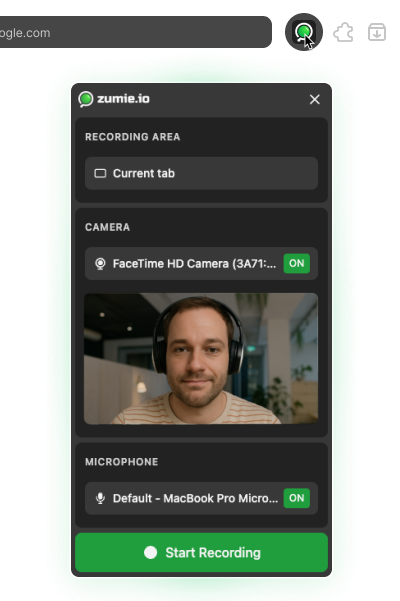
Hit record and do your thing. Zumie captures everything — your screen, mouse, keyboard, and webcam.
Edit if Needed
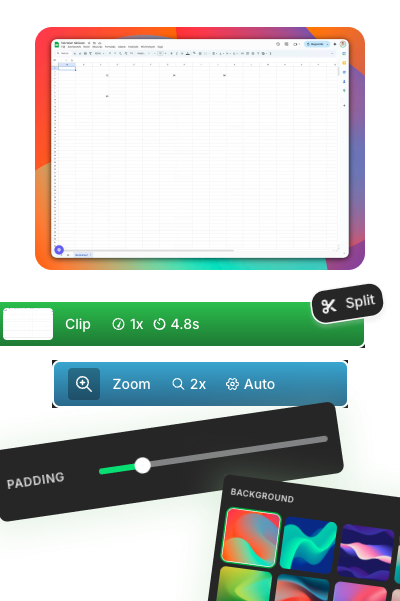
The editor opens automatically with smart zoom already applied. Make adjustments or use it as-is.
Export & Share
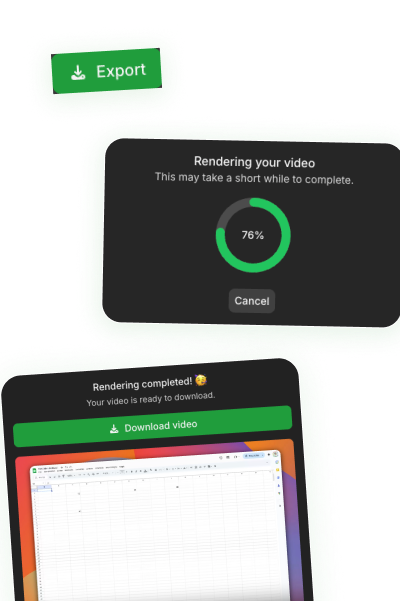
Download your video or generate an instant share link. Send it to anyone — no account needed on their end.
Ready to Create Your First Video?
Install Zumie now and make your screen recordings stand out.
Made with Zumie
Real Zumie recordings in the tools you already use.
The Screen Studio look, without the Mac or the subscription
How Zumie compares to the two tools people usually ask about.
| Zumie | Screen Studio | Loom | |
|---|---|---|---|
| Auto zoom on your clicks | Yes, in Chrome tabs | Yes | No |
| Backgrounds, padding & smooth cursor | Yes | Yes | No, raw screen |
| Works on Windows & Chromebook | Yes, any OS with Chrome | Mac only | Yes |
| Setup | Browser extension, no signup | Desktop app | Account required |
| Price | Free, or $49 once | $108/year | Monthly subscription |
What people say
Real reviews from the Chrome Web Store
Polish & Perfect
Fine-tune your recordings so every detail lands exactly right
Simple, Transparent Pricing
Every feature is free to try. Pay once to drop the watermark and export in HD. No subscription, ever.
Free
Every feature, with a small watermark
- All recording features
- All editing features
- Usage on 3 devices
- Automatic zoom
- Click & keyboard highlights
- Watermark on exports
- Export in standard quality
Lifetime Deal
One payment, yours forever
- Everything in Free
- No watermark
- Export in HD and MAX quality
- Project history
- Priority support
- Unlimited recordings
- Lifetime updates
7-day money-back guarantee. Secure checkout by Stripe.
Frequently Asked Questions
Got questions? We've got answers.
Does it work on Windows, Mac and Chromebook?
Yes. Zumie is a Chrome extension, so it runs anywhere desktop Chrome runs: Windows, macOS, Linux and ChromeOS. It also works in Chromium browsers like Edge, Brave and Arc. It doesn't run on phones.
What do I get for free?
Every recording and editing feature, including auto zoom, click effects and the keyboard overlay. Free exports have a small watermark and standard quality. The $49 lifetime license removes the watermark and unlocks HD and MAX export.
How is Zumie different from Screen Studio or Loom?
Screen Studio makes great looking videos but only runs on Mac and costs $108 a year. Loom is built for quick video messages and doesn't add zooms or backgrounds. Zumie gives you the polished, zoomed-in look on any computer with Chrome, for a one-time $49.
How does the automatic zoom work?
While you record a Chrome tab, Zumie tracks your clicks, typing and mouse movement. When you stop, it builds smooth zooms that frame what you clicked, zooms in closer on small buttons and pulls back while you scroll, with no manual keyframing. Every zoom stays editable in the timeline. Auto zoom only follows clicks inside Chrome tabs. If you record your whole screen or another app, you can still add zooms manually in the editor.
Can I edit the video after recording?
Absolutely! The editor opens automatically after recording with smart zoom already applied. You can fine-tune zoom levels, timing, and positions, or even remove automatic zoom entirely if you prefer manual control.
Does it work on all websites and applications?
Zumie can record a browser tab, a single window, or your entire screen, including desktop apps. Auto zoom and click effects work in Chrome tabs, since that's where the extension can see your clicks. For windows and full-screen recordings you add zooms by hand in the editor.
Where are the recordings stored?
All recordings are stored locally on your device, giving you full control over your content. We do not upload anything to our servers unless you use the share link feature.
Can I upgrade from Free to Lifetime later?
Absolutely! You can upgrade anytime. All your settings will be preserved.
Is the lifetime deal really lifetime?
Yes! One payment gives you access to Zumie forever, including all future updates.
What payment provider do you use?
We use Stripe for payments. You can use your credit card, PayPal, or other payment methods supported by Stripe.
What is the refund policy?
We offer a 7-day money-back guarantee. If you are not satisfied with Zumie, you can get a full refund within 7 days of your purchase.
Still have questions?
We're here to help! Reach out to our support team and we'll get back to you as soon as possible.
Contact usMake your next demo
look edited
Record a tab, and the zooms are already there when you stop. Free to start, no signup, no credit card.
Zumie runs in desktop Chrome. Get the link on your computer:
One email with the link, then a few tips a year at most. Or open the store page